NDA🔐
NDA🔐
NDA🔐
Designing AI Capture for Content
Microsoft | Duration: May 2024 – June 2024
Designing AI Capture for Content
Microsoft | Duration: May 2024 – June 2024
Designing AI Capture for Content
Microsoft | Duration: May 2024 – June 2024
Improving Users' workflow into simple and easier - Designing AI Capture content to increase productivity
Improving Users' workflow into simple and easier - Designing AI Capture content to increase productivity
Improving Users' workflow into simple and easier - Designing AI Capture content to increase productivity
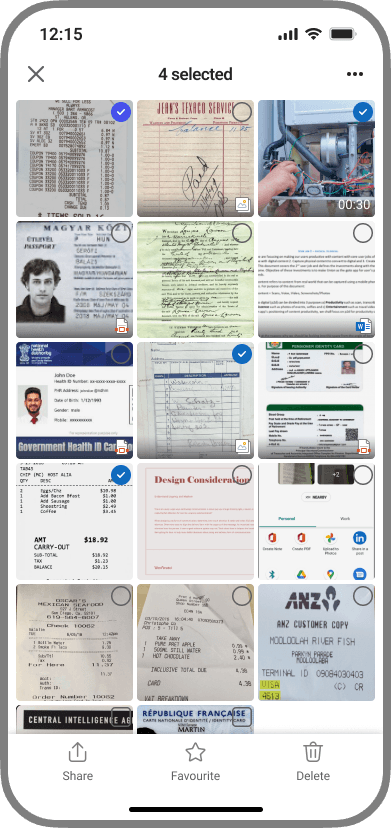
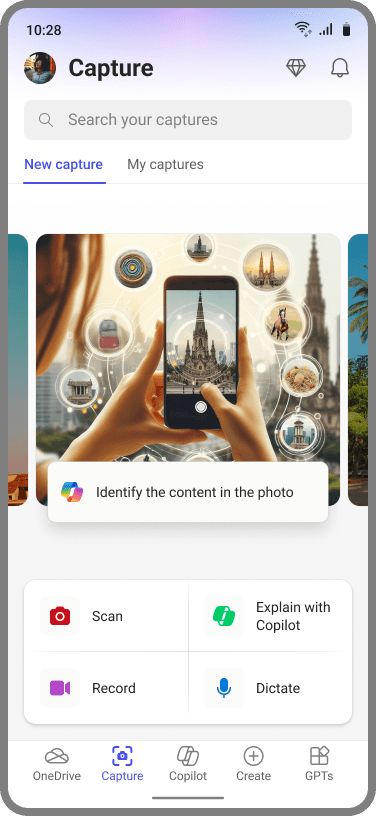
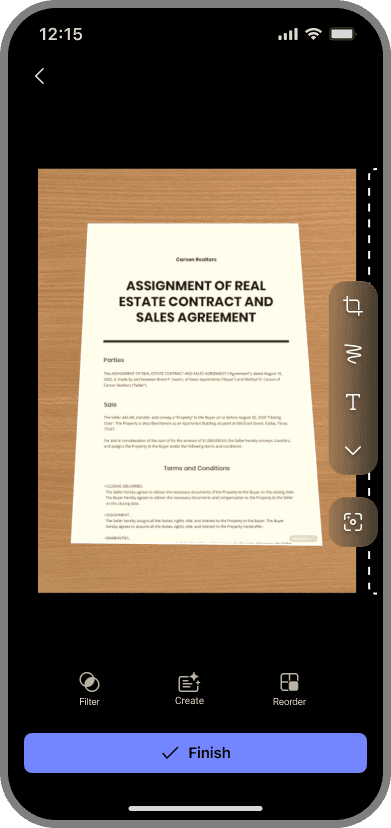
During this internship, I was placed on the M365 Copilot team within Microsoft, where our mission was to reimagine the Capture Content experience in the Microsoft 365 Copilot and explore how AI and Copilot could deliver a more personalized and engaging experience for users.
I worked on two major projects, one exploring a potential design direction for a new core AI feature within M365 Copilot, and another focused on a less experimental feature that is scheduled to ship to the over 1+ billion monthly M365 Copilot users in the near future.
Throughout these projects, I collaborated closely with product managers, engineers, and designers, contributing to the design of user experiences, frameworks, and roadmaps that will guide future development of M365’s AI capabilities. I also partnered with full-time employees to conduct research, refine designs, and deliver a fully developed feature ready for engineering handoff.
Due to NDA restrictions, I am unable to share detailed processes or final deliverables at this time. Please reach out if you are interested in learning more about my experience at Microsoft and the work I contributed to.
During this internship, I was placed on the M365 Copilot team within Microsoft, where our mission was to reimagine the Capture Content experience in the Microsoft 365 Copilot and explore how AI and Copilot could deliver a more personalized and engaging experience for users.
I worked on two major projects, one exploring a potential design direction for a new core AI feature within M365 Copilot, and another focused on a less experimental feature that is scheduled to ship to the over 1+ billion monthly M365 Copilot users in the near future.
Throughout these projects, I collaborated closely with product managers, engineers, and designers, contributing to the design of user experiences, frameworks, and roadmaps that will guide future development of M365’s AI capabilities. I also partnered with full-time employees to conduct research, refine designs, and deliver a fully developed feature ready for engineering handoff.
Due to NDA restrictions, I am unable to share detailed processes or final deliverables at this time. Please reach out if you are interested in learning more about my experience at Microsoft and the work I contributed to.
During this internship, I was placed on the M365 Copilot team within Microsoft, where our mission was to reimagine the Capture Content experience in the Microsoft 365 Copilot and explore how AI and Copilot could deliver a more personalized and engaging experience for users.
I worked on two major projects, one exploring a potential design direction for a new core AI feature within M365 Copilot, and another focused on a less experimental feature that is scheduled to ship to the over 1+ billion monthly M365 Copilot users in the near future.
Throughout these projects, I collaborated closely with product managers, engineers, and designers, contributing to the design of user experiences, frameworks, and roadmaps that will guide future development of M365’s AI capabilities. I also partnered with full-time employees to conduct research, refine designs, and deliver a fully developed feature ready for engineering handoff.
Due to NDA restrictions, I am unable to share detailed processes or final deliverables at this time. Please reach out if you are interested in learning more about my experience at Microsoft and the work I contributed to.
My Role and Contributions
Product Design | Research | Prototyping | UX Strategy
My Role and Contributions
Product Design | Research | Prototyping | UX Strategy
My Role and Contributions
Product Design | Research | Prototyping | UX Strategy
I was part of the M365 Copilot team, working on understanding how AI can help Gen-Z users and how design can improve their daily productivity.
I contributed to:
Mapping user behavior and attention patterns
Defining design principles for calm and human-centered interactions
Prototyping subtle visual cues, micro-interactions, and system responses
Testing ideas internally and refining concepts based on feedback
I was part of the M365 Copilot team, working on understanding how AI can help Gen-Z users and how design can improve their daily productivity.
I contributed to:
Mapping user behavior and attention patterns
Defining design principles for calm and human-centered interactions
Prototyping subtle visual cues, micro-interactions, and system responses
Testing ideas internally and refining concepts based on feedback
I was part of the M365 Copilot team, working on understanding how AI can help Gen-Z users and how design can improve their daily productivity.
I contributed to:
Mapping user behavior and attention patterns
Defining design principles for calm and human-centered interactions
Prototyping subtle visual cues, micro-interactions, and system responses
Testing ideas internally and refining concepts based on feedback
Context
Context
The world of a solo entrepreneur is one of constant motion and fleeting ideas. A brilliant business plan sketched on a coffee shop napkin, critical client feedback on a whiteboard, a string of photos from a site visit. These are the atoms of innovation. Yet, for Gen Z entrepreneurs, who live and work on their mobile devices, the friction between capturing these moments and turning them into actionable documents is immense. The current process is a broken chain of manual work across multiple apps, leading to lost context, wasted hours, and ultimately, abandoned ideas.
Context
The world of a solo entrepreneur is one of constant motion and fleeting ideas. A brilliant business plan sketched on a coffee shop napkin, critical client feedback on a whiteboard, a string of photos from a site visit. These are the atoms of innovation. Yet, for Gen Z entrepreneurs, who live and work on their mobile devices, the friction between capturing these moments and turning them into actionable documents is immense. The current process is a broken chain of manual work across multiple apps, leading to lost context, wasted hours, and ultimately, abandoned ideas.
Brief
Brief
Started the deep dive with an open-ended brief: to explore how generative AI could solve for mobile content creation for Gen Z. After initial research into their entrepreneurial workflows, we refined our focus and developed a clear hypothesis and goal.
Problem Hypothesis
Problem Hypothesis
Believing that Gen Z entrepreneurs are struggling to convert their visual ideas into actionable documents because current tools are fragmented, require high manual effort, and offer "black box" AI that they cannot trust or control.
Goal
Goal
Create a product concept that uses transparent, agentic AI to solve the 'capture-to-document' friction, enabling users to go from a photo to a polished M365 document in minutes, not hours.
Photos
Notes
Sketches
Smart Capture AI
Transparent AI Processing

Word

PowerPoint

Excel
Brief
Started the deep dive with an open-ended brief: to explore how generative AI could solve for mobile content creation for Gen Z. After initial research into their entrepreneurial workflows, we refined our focus and developed a clear hypothesis and goal.
Problem Hypothesis
Believing that Gen Z entrepreneurs are struggling to convert their visual ideas into actionable documents because current tools are fragmented, require high manual effort, and offer "black box" AI that they cannot trust or control.
Goal
Create a product concept that uses transparent, agentic AI to solve the 'capture-to-document' friction, enabling users to go from a photo to a polished M365 document in minutes, not hours.
Photos
Notes
Sketches
Smart Capture AI
Transparent AI Processing
Word
PowerPoint
Excel
Process
Process
starting the quest.
Began by asking fundamental questions to understand the landscape, our users, and the technology.
Process
starting the quest.
Began by asking fundamental questions to understand the landscape, our users, and the technology.
what are our cohorts and assumptions?
Focused on a specific, high-value user segment to guide our design decisions.
Role
Gen Z Entrepreneurs, Freelancers, Side-Hustlers (Ages 18-24)
User Segments
Digital Natives: Mobile-first, expect seamless UX, early adopters of AI.
Context
Often work alone, resource-constrained, high value on time and efficiency.
Assumptions
We assumed that AI models are capable of multimodal reasoning (image + text + voice). Our design challenge was not the model's capability, but the user's trust in it.
what are our cohorts and assumptions?
Focused on a specific, high-value user segment to guide our design decisions.
Role
Gen Z Entrepreneurs, Freelancers, Side-Hustlers (Ages 18-24)
User Segments
Digital Natives: Mobile-first, expect seamless UX, early adopters of AI.
Context
Often work alone, resource-constrained, high value on time and efficiency.
Assumptions
We assumed that AI models are capable of multimodal reasoning (image + text + voice). Our design challenge was not the model's capability, but the user's trust in it.
what is the role of mobile devices in business?
Mobile isn't just for communication; it's the primary computer for this cohort.
Primary Work Tool
96% of Gen Z use their smartphone for work-related tasks daily.
Point of capture
The phone's camera is the default tool for capturing real-world information.
Friction Intolerance
62% will abandon an app or website that is difficult to navigate on mobile.
what is the role of mobile devices in business?
Mobile isn't just for communication; it's the primary computer for this cohort.
Primary Work Tool
96% of Gen Z use their smartphone for work-related tasks daily.
Point of capture
The phone's camera is the default tool for capturing real-world information.
Friction Intolerance
62% will abandon an app or website that is difficult to navigate on mobile.
how does a day in the life of a user go?
To empathize, I have mapped their activities around a key business event: a client meeting or site visit.
Pre-Visit
Plan for the day
Prepare meeting materials
Research client
During-Visit
Document discussions
Capture whiteboard sketches
Take photos of the environment
Post-Visit
Struggle to organize notes/photos
Lose context from captured items
Spend hours formatting documents
how does a day in the life of a user go?
To empathize, I have mapped their activities around a key business event: a client meeting or site visit.
Pre-Visit
Plan for the day
Prepare meeting materials
Research client
During-Visit
Document discussions
Capture whiteboard sketches
Take photos of the environment
Post-Visit
Struggle to organize notes/photos
Lose context from captured items
Spend hours formatting documents
what are the jobs to be done?
Used the JTBD framework to understand the real outcomes users are trying to achieve.
Job Area
Associated Goals (The "Job")
Move My Business Forward
Convert a fleeting idea into a concrete plan I can act on.
Share a concept with a stakeholder to get a decision quickly.
Preserve Business Intelligence
Ensure valuable information captured in the field isn't lost.
Build an organized, searchable repository of my business knowledge.
Project Professionalism
Create polished, well-formatted documents that make my small business look credible.
Save My Own Time
Minimize time spent on low-value administrative tasks (like re-typing and formatting).
what are the jobs to be done?
Used the JTBD framework to understand the real outcomes users are trying to achieve.
Job Area
Associated Goals (The "Job")
Move My Business Forward
Convert a fleeting idea into a concrete plan I can act on.
Share a concept with a stakeholder to get a decision quickly.
Preserve Business Intelligence
Ensure valuable information captured in the field isn't lost.
Build an organized, searchable repository of my business knowledge.
Project Professionalism
Create polished, well-formatted documents that make my small business look credible.
Save My Own Time
Minimize time spent on low-value administrative tasks (like re-typing and formatting).
what is business content?
The "content" is messy, varied, and captured in the wild.
Captured As...
Whiteboard sketch
Handwritten notes
Photo of a receipt
Diagram on a napkin
To Become...
Business Plan (Word), Pitch Deck (PowerPoint)
Meeting Summary (OneNote), Project Plan (Word)
Expense Report (Excel)
Process Flow (Visio), Product Mockup
what is business content?
The "content" is messy, varied, and captured in the wild.
Captured As...
Whiteboard sketch
Handwritten notes
Photo of a receipt
Diagram on a napkin
To Become...
Business Plan (Word), Pitch Deck (PowerPoint)
Meeting Summary (OneNote), Project Plan (Word)
Expense Report (Excel)
Process Flow (Visio), Product Mockup
what is the content creation journey?
The current journey is long and full of friction. We focused on the "Create" step.
Research → Plan → Create → Assess → Revise → Conclude
Inside Create, the journey is broken:
Capture (Phone) → Find (Gallery) → Re-type (Notes/Word) → Format (Word/PPT) → Share
what is the content creation journey?
The current journey is long and full of friction. We focused on the "Create" step.
Research → Plan → Create → Assess → Revise → Conclude
Inside Create, the journey is broken:
Capture (Phone) → Find (Gallery) → Re-type (Notes/Word) → Format (Word/PPT) → Share
generative AI and content creation.
We leveraged M365 Copilot's potential by designing for multimodal, transparent AI.
AI Capability
How Smart Capture uses it
Multimodal Input
Processes image (the photo), text (OCR), and voice (user's explanation) together for richer context.
Reasoning & Synthesis
Doesn't just transcribe; it understands it's a business plan and suggests the appropriate structure and format.
Transparency
Shows its confidence level ("I'm 92% sure this is a revenue figure") and its reasoning, building user trust.
generative AI and content creation.
We leveraged M365 Copilot's potential by designing for multimodal, transparent AI.
AI Capability
How Smart Capture uses it
Multimodal Input
Processes image (the photo), text (OCR), and voice (user's explanation) together for richer context.
Reasoning & Synthesis
Doesn't just transcribe; it understands it's a business plan and suggests the appropriate structure and format.
Transparency
Shows its confidence level ("I'm 92% sure this is a revenue figure") and its reasoning, building user trust.
challenges in AI-powered content creation?
The biggest challenge isn't technology; it's trust.
Challenge
Our Approach
The "Black Box" Problem
Users distrust AI they can't understand.
The Control Paradox
Users reject full automation that removes their agency.
The Accuracy Fallacy
The goal isn't 100% accuracy; it's trustworthiness.
challenges in AI-powered content creation?
The biggest challenge isn't technology; it's trust.
Challenge
Our Approach
The "Black Box" Problem
Users distrust AI they can't understand.
The Control Paradox
Users reject full automation that removes their agency.
The Accuracy Fallacy
The goal isn't 100% accuracy; it's trustworthiness.
concluding the problem hypothesis.
Research led us to a refined, more powerful problem statement.
Problem Hypothesis 2.0
Problem Hypothesis 2.0
Believing that Gen Z entrepreneurs are avoiding the conversion of valuable ideas because current tools are fragmented (multi-app), labor-intensive (manual), and untrustworthy (black-box AI), forcing them to choose between losing time or losing the idea.
concluding the problem hypothesis.
Research led us to a refined, more powerful problem statement.
Problem Hypothesis 2.0
Believing that Gen Z entrepreneurs are avoiding the conversion of valuable ideas because current tools are fragmented (multi-app), labor-intensive (manual), and untrustworthy (black-box AI), forcing them to choose between losing time or losing the idea.
ideation & final solution.
After brainstorming multiple concepts, we prioritized one core idea that directly addressed the refined problem.
Smart Capture AI: A single, mobile-first experience that uses transparent AI to turn any visual capture into a structured M365 document in minutes.
ideation & final solution.
After brainstorming multiple concepts, we prioritized one core idea that directly addressed the refined problem.
Smart Capture AI: A single, mobile-first experience that uses transparent AI to turn any visual capture into a structured M365 document in minutes.
Contact for details
Details of this work, including internal systems and prototypes, can’t be shared publicly. But I’d be happy to walk you through more in a one-on-one conversation. 🔐
Contact for details
Details of this work, including internal systems and prototypes, can’t be shared publicly. But I’d be happy to walk you through more in a one-on-one conversation. 🔐
my takeaways & reflections.
My 8-week internship at Microsoft was an incredible journey of growth, challenge, and discovery. Working within the Experience + Devices organization on a real-world M365 project taught me more than any classroom could. Here are my key learnings:
Designing for an Ecosystem, Not Just an App
Designing for an Ecosystem, Not Just an App
Designing for an Ecosystem, Not Just an App
My biggest shift was moving from designing a feature to designing for an ecosystem. Every decision had to consider the M365: How would this integrate with Teams? How would the output live in Word or PowerPoint? How would it feel consistent with the Fluent Design System? I learned that a feature's success isn't just its standalone usability, but how seamlessly it connects to the user's entire digital life.
My biggest shift was moving from designing a feature to designing for an ecosystem. Every decision had to consider the M365: How would this integrate with Teams? How would the output live in Word or PowerPoint? How would it feel consistent with the Fluent Design System? I learned that a feature's success isn't just its standalone usability, but how seamlessly it connects to the user's entire digital life.
The Nuance of Designing for Copilot & AI
The Nuance of Designing for Copilot & AI
The Nuance of Designing for Copilot & AI
Working directly with Copilot concepts taught me that AI/UX design is less about creating a perfect, all-knowing AI and more about designing a graceful partnership. The key isn't to prevent AI errors, but to design an interface that makes errors transparent and recoverable. My focus shifted from "How can the AI get this right?" to "How can the user and AI recover together when things get ambiguous?"
Working directly with Copilot concepts taught me that AI/UX design is less about creating a perfect, all-knowing AI and more about designing a graceful partnership. The key isn't to prevent AI errors, but to design an interface that makes errors transparent and recoverable. My focus shifted from "How can the AI get this right?" to "How can the user and AI recover together when things get ambiguous?"
Balancing Blue-Sky Innovation with Reality
Balancing Blue-Sky Innovation with Reality
Balancing Blue-Sky Innovation with Reality
The initial brief was wide open. It was exciting, but also daunting. A key lesson from my manager, Praveen Sinha, was how to navigate ambiguity. I learned to cycle rapidly between broad, innovative thinking ("What if AI could create entire lesson plans?") and pragmatic constraints ("What can we realistically prototype in 8 weeks that aligns with business goals?"). This taught me the art of being a visionary and a pragmatist at the same time.
The initial brief was wide open. It was exciting, but also daunting. A key lesson from my manager, Praveen Sinha, was how to navigate ambiguity. I learned to cycle rapidly between broad, innovative thinking ("What if AI could create entire lesson plans?") and pragmatic constraints ("What can we realistically prototype in 8 weeks that aligns with business goals?"). This taught me the art of being a visionary and a pragmatist at the same time.
"Control" is the Most Important Feature in an AI Product
"Control" is the Most Important Feature in an AI Product
"Control" is the Most Important Feature in an AI Product
My research with gen-Z users and entrepreneurs consistently showed that they feared AI taking over. A major takeaway was that user control is not an obstacle to automation, it is the gateway to it. By building in features like confidence scores, clear "override" buttons, and visible AI reasoning, we weren't slowing the user down. I were giving them the psychological safety needed to trust the automation in the first place.
My research with gen-Z users and entrepreneurs consistently showed that they feared AI taking over. A major takeaway was that user control is not an obstacle to automation, it is the gateway to it. By building in features like confidence scores, clear "override" buttons, and visible AI reasoning, we weren't slowing the user down. I were giving them the psychological safety needed to trust the automation in the first place.